Walmart Store Configuration
The Walmart Marketplace APIs provide resources for sellers to manage their items, orders, prices, promotions, inventory and reports on Walmart.com. The Walmart Developer Portal provides all the tools you need to directly integrate with Walmart Marketplace APIs.
Configuring the Walmart Store in ILS, you need to create an API key in Walmart Developer portal.
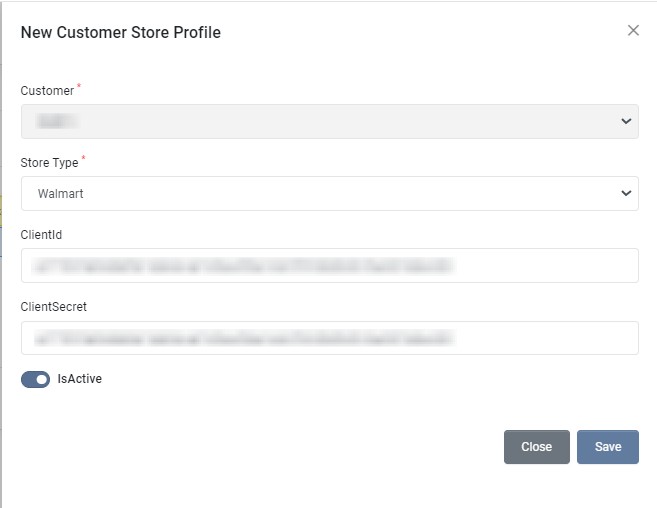
| Field | Required | Description |
|---|---|---|
| Customer | Select the Customer. By default, user logged in customer account is selected. | |
| Store Type | Select store type as Wayfair | |
| ClientId | Get Client Id, as mentioned in Generate an API Key | |
| ClientSecret | Get Client Secret, as mentioned in Generate an API Key | |
| IsActive | Choose whether this profile is active. | |
| MatchSplitQty | Choose whether match split quantity is enabled. | |
| Product Sync | Choose whether Store Product to ILS sync is enabled for this profile. | |
| Inventory Sync | Choose whether automatic inventory sync from ILS to Store is enabled for this profile. | |
| Order Sync | Choose whether automatic store order import to ILS is enabled for this profile. | |
| Order Acknowledge | Choose whether automatic store order acknowledgement is enabled for this profile. | |
| Shipment Status Sync | Choose whether automatic order shipment status and tracking number sync is enabled for this profile. | |
| Request Label | Choose whether to request dropship labels for this profile. |
Register as a Walmart Seller
To get started with Marketplace APIs, you need to go through the registration process in Walmart Seller Help.
- Go to Getting Started
- Go through onboarding and registration steps.
- Make sure you have been approved to sell your items on Walmart Marketplace.
Generate an API Key
API keys allow third-party Solution Providers to access your Walmart Marketplace account data, so it’s important to only generate keys for trusted providers. Only sellers with admin level access can generate API keys. In this guide, we’ll walk you through the steps to generate an API key for a third-party Solution Provider.
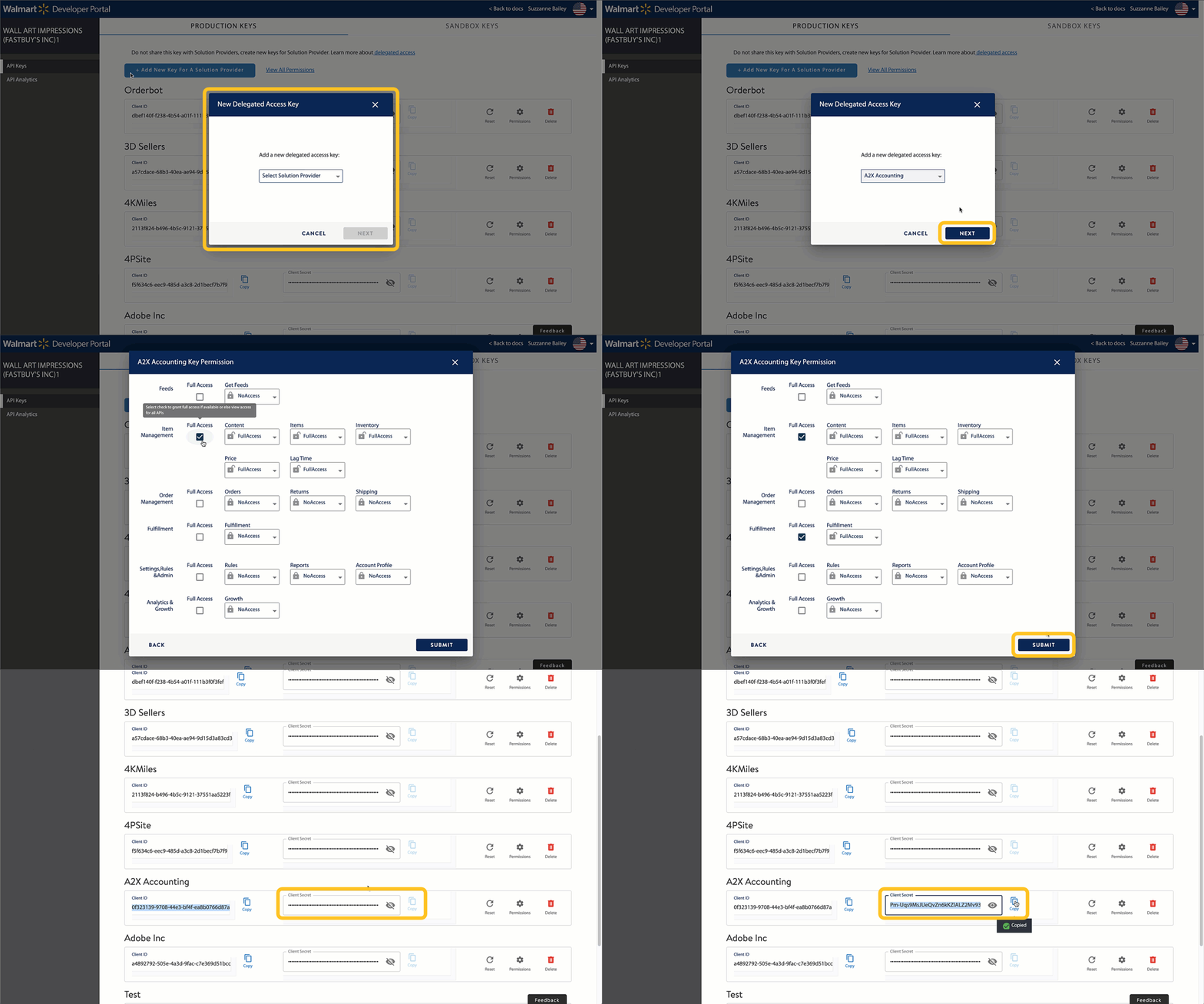
- Navigate to the Developer Portal. Enter your login information. On the API page, select the Add New Key For A Solution Provider button.
- From the drop-down list, choose the Solution Provider you want to generate a key for. Select Next.
- Set your permissions by specifying the level of access you would like to grant to the Solution Provider. When you’re done, choose Submit.
- Order Management - Full Access
- Fullfilment - Full Access
- On the next page, you will see your Client ID and Client Secret. Copy and paste these into your Solution Providers platform to allow them to access your Walmart.com account data.